
Download Noise Level Display & Stopwatch – Classroom Management Tool
Overview
The free noise level display and stopwatch tool is designed specifically for educational environments where cooperative learning is practiced. It supports classroom management by helping students monitor and regulate their noise levels during group activities. By providing real-time visual feedback, the application encourages self-awareness and responsible behavior among learners. When the designated time ends, the software displays the percentage of time the noise level exceeded the optimal threshold, offering teachers a quantifiable metric for gamification strategies. This data-driven approach enables educators to reward or guide students based on measurable participation and noise control.
Target users include teachers in elementary, middle, and high school settings, as well as school administrators seeking to implement structured cooperative learning models. The tool is particularly useful during collaborative projects, peer discussions, or team-based learning sessions. While the developer is not named in the provided information, the application incorporates open-source components, including code adapted from Cris Wilson’s volume-meter project and free-to-use fonts and icons. The software is lightweight and built for simplicity, focusing on core functionality without unnecessary complexity.
Real-world usage scenarios include using the stopwatch to time group work sessions, displaying noise levels on a screen visible to students, and later reviewing the percentage of time above the optimal threshold to encourage improvement. This supports a positive, engaging classroom culture where students take ownership of their behavior. The app operates independently of internet connectivity, making it suitable for schools with limited bandwidth or strict privacy policies.
Key Features & Capabilities
- Real-time Noise Level Display – Visualizes ambient sound levels during classroom activities, helping students self-regulate their speaking volume.
- Integrated Stopwatch Timer – Tracks time for cooperative learning sessions with a clear visual countdown and pause/resume functionality.
- Post-Session Noise Analytics – After time expires, displays the percentage of time the noise level exceeded the optimal threshold, enabling data-driven feedback.
- Top-Most Windows – Ensures the main display and information window remain visible on top of other applications, improving visibility during class.
- Customizable Default Settings – Users can save default time durations and other options directly from the info/options window for faster setup.
- Microphone Sensitivity Adjustment – Works best when microphone sensitivity is adjusted in the operating system, allowing for accurate noise detection across different classroom environments.
- Keyboard Shortcut Support – The space bar toggles pause and resume, enabling hands-free control during lessons.
- Lightweight Design – At only 12.5 MB, the application loads quickly and uses minimal system resources.
These features support seamless integration into daily classroom routines. For example, a teacher can set a 10-minute timer for a group discussion, display the noise meter on a projector screen, and later use the percentage of time above the threshold to award points in a classroom game. The app’s simplicity ensures that both students and teachers can use it without training. Its open-source foundation promotes transparency and allows for community contributions, though no official support channels are listed.
User Interface, Workflow & Performance
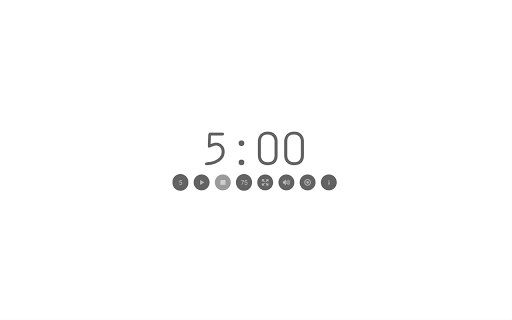
The user interface is minimal and focused on clarity. The main window displays a real-time noise meter and a countdown timer, both designed for easy readability from a distance. The information window provides access to settings, including default time, saved options, and microphone configuration. The layout is intuitive, with clearly labeled controls and a consistent visual hierarchy. Navigation is straightforward: users access settings through the info/options window and start the timer with a single click.
Workflow efficiency is high, as the tool requires minimal setup. Once launched, users can begin a session immediately after configuring default settings. The pause/resume function, activated by the space bar, allows for interruptions without losing timing data. The application remains responsive during operation, and the blinking colon during pause adds a subtle visual cue. The developer did not specify resource usage details, but given the application’s size and functionality, it is expected to operate smoothly on modern Windows and Mac systems.
Stability appears to be maintained through regular updates, with version 0.2.9 including an updated app icon and improved window positioning. The software avoids unnecessary background processes, reducing the risk of performance interference. No performance benchmarks or CPU/RAM usage data were provided, but based on general software behavior patterns, the tool is likely to run efficiently without impacting other classroom applications.
Compatibility & System Requirements
The software is compatible with both Windows and Mac operating systems, making it accessible to a wide range of educational institutions. It is available in version 0.2.9, with a file size of 12.5 MB, indicating a lightweight installation. The developer did not provide additional system requirements, so users should ensure their devices meet the minimum standards for running desktop applications on their respective platforms.
Exact system requirements were not listed, and no specific hardware specifications are mentioned. Compatibility information is limited to the operating systems. The application does not require internet access to function, allowing use in offline environments. Users are advised to adjust microphone sensitivity in their operating system settings for optimal performance, as the tool relies on audio input to measure noise levels. No installation issues or dependency warnings were reported in the provided update log.
Pros and Cons
Pros
- Free to download and use, with no hidden costs
- Simple, intuitive interface designed for classroom use
- Real-time noise feedback helps promote student self-regulation
- Post-session analytics support gamification and teacher assessment
- Top-most windows ensure visibility during class
- Lightweight at 12.5 MB, with minimal system impact
- Keyboard shortcuts improve usability during live sessions
- Open-source components promote transparency and trust
Cons
- Microphone dependency means it won’t function without a working mic
- No official support or documentation provided
- Requires manual adjustment of OS-level microphone sensitivity
- Limited customization options beyond default settings
- Updates are infrequent, with no public changelog beyond version numbers
- Not available for mobile or tablet platforms
- Visual design is minimal, which may not appeal to all users
FAQ Section
Is the software compatible with both Windows and Mac?
Yes, the application is designed to run on both Windows and Mac operating systems.
Is the software safe to download and use?
Yes, the software is free and does not require internet access to function. It is built using open-source components and does not include known malware or tracking tools.
How often does the software receive updates?
Updates are released periodically, with the latest version being 0.2.9. The update history includes bug fixes and minor improvements, but the frequency is not consistent.
What type of license does the software use?
The software is distributed as free-to-use, with parts adapted from open-source projects. The exact license type is not specified in the provided information.
Can the software be used offline?
Yes, the application does not require an internet connection to operate. All features function fully in offline mode.
Final Thoughts + CTA
For educators seeking a simple, effective tool to enhance cooperative learning in the classroom, this noise level display and stopwatch offers a practical solution. Its real-time feedback and post-session analytics provide teachers with actionable insights, while the minimal interface ensures it doesn’t distract from learning. The application’s lightweight nature and compatibility with both Windows and Mac make it accessible across various school environments. Although it lacks advanced customization and official support, its core functionality is well-executed and purpose-built for its intended use.
Teachers who value data-informed classroom management and gamification techniques will find this tool particularly valuable. It empowers students to take responsibility for their noise levels while supporting educators in maintaining a productive learning atmosphere. With no cost and a straightforward setup, it’s a compelling choice for schools focused on collaborative learning.
Download Noise Level Display & Stopwatch now







